Building your first conversational AI agent: A beginner’s guide
- Written by
- Jack Limebear
- Published
- Last updated
ListenListen to this article
A recent study by Gartner reveals that conversational AI is quickly becoming one of the biggest cost and efficiency levers in customer service.
Gartner predicts that by 2029, conversational AI will autonomously resolve 80% of common customer service issues without human intervention, reducing operational costs by 30% as more enterprises automate customer interactions across both voice and chat.
An agentic solution that understands your internal business documents, can reason in the moment, and can carry conversations through nuanced pathways has use cases in support, front desk reception, sales, and internal operations.
But for non-technical teams, the idea of building out an end-to-end conversational agent may seem daunting. This guide levels the playing field.
We’ll walk through everything a non-technical builder needs to get started. We’ll cover a high-level overview of what conversational AI agents are, how they work, prerequisites before building, and the steps beginners can follow to build a conversational AI agent with zero coding.
Summary
- A conversational AI agent combines a large language model, a knowledge base with retrieval augmented generation, tool calling, and guardrails to hold realistic, context aware conversations with users.
- Agents can run as chat, voice, or both. Voice agents add speech to text (STT) to understand what a user says and text to speech (TTS) to reply out loud.
- Beginners don’t need to write code to build a conversational AI agent, as platforms like ElevenAgents handle the infrastructure for you.
- Define your agent’s purpose and audience as precisely as possible before building to overcome common mistakes.
- Remember to run quality assurance, preferably with real users, before launching.
What is a conversational AI agent?
A conversational AI agent is a system that uses artificial intelligence to understand user inputs in natural language and generate responses in real time. It connects to internal knowledge bases and retrieves information beyond its own context to deliver responses to users.
In a voice-based conversational AI, a dedicated voice layer handles spoken interactions: STT converts the user’s speech into text, while TTS generates natural-sounding spoken responses from the AI.
Conversational AI systems train on enormous amounts of data across speech and text. Over time, this data allows the model to build up an understanding of how it should process human language, which it then pulls from to logically converse with humans.
Every conversational AI agent, whether it’s voice, chat, or both, uses the same core technologies to make this possible:
- Large Language Model (LLM): Generates coherent, contextually appropriate responses.
- Knowledge base and retrieval-augmented generation (RAG): Grounds the agent’s answers in your own internal knowledge base instead of relying only on information the model already knows.
- Tool calling: Allows AI systems to take action, such as checking the status of an order or booking a slot on a calendar, rather than only discussing the action.
- Guardrails: These run in parallel to the model, keeping the agent on-topic and on-brand within the boundaries you set for what it should and shouldn’t do.
- Deployment channels: The different ways a conversational AI agent can interact with users, such as phone calls, websites, mobile apps, and messaging platforms.
Beyond this, voice agents add a real-time speech layer on top of that same core:
- Speech to text: Converts what the user says into text that the LLM can then process.
- Text to speech: A TTS engine turns the agent’s response into natural-sounding speech, which the user then hears.
- Turn-taking: A system that manages the back and forth of a live conversation, including when to listen, when to speak, and how to handle interruptions.
The most advanced conversational agents can operate in chat and voice from a single configuration, while sharing context between the two. Its capabilities far exceed what a traditional chatbot can achieve.
A traditional chatbot matches what a user types to the closest branch in a pre-written decision tree, only being able to handle the exact inputs it’s designed for. Conversational AI agents use the above systems to reason beyond scripted paths, taking action and having real-time conversations with users.
What can you use conversational AI agents for?
Across the board, whether it’s within an agent that solves customer service issues for users or an outbound AI SDR that finds new opportunities for sales teams, conversational AI agents naturally fit into existing workflows.
No matter what industry your business works in, there is likely a conversational AI use case for you. Here’s a quick overview of how a few different fields use AI agents in action.
- Customer support: An AI agent on your site could resolve frequently asked questions, check order statuses, handle returns, or escalate a difficult query to a human agent. Klarna is one of several businesses that have significantly scaled customer support with a conversational AI agent.
- Sales outreach: Outbound AI SDR agents can qualify leads and book meetings for human reps. They can work around the clock, delivering a consistently high bar for call quality and conversation. Employment Hero used ElevenAgents to call existing customers about its new AI Recruitment Agent, achieving a 33% answer rate and driving product activation at a scale that would be impossible with human agents alone.
- Appointment scheduling: Businesses can create fully automated AI agent receptionists that book appointments and help customers onboard themselves with voice. With Reception.ai, even beginners can build an end-to-end scheduling system with ease.
- Education: AI tutors bring learning materials to life, empowering learners with personalized support. Brilliant launched conversational AI tutors on their platform to walk students through complex problems in real time, adding a whole new level of interactivity to the learning experience.
- Healthcare support: Health providers can implement a conversational AI agent on their site to help with multilingual patient onboarding while meeting HIPAA compliance. Everlywell used ElevenAgents to improve conversion rates for Spanish-speaking members by 3.5x versus traditional Interactive Voice Response (IVR).
- Logistics and delivery operations: Conversational AI agents can handle outbound calls, delivery confirmations, status updates, and exception management. Deliveroo used ElevenAgents to re-engage over 80% of inactive riders and contact 86% of partner sites for Rider Check-In activation.
- Internal assistants: AI agents embed directly into the HR onboarding process to reduce total onboarding times and scale training workflows. TELUS uses ElevenAgents to reduce training time by 20% for new hires, training new users on over 90,000 simulated customer conversations.
Part of what drives the flexibility of use cases is that platforms like ElevenAgents have an enormous range of integrations you can implement. Connect Google Calendar and Calendly for a scheduler agent or build out complex telephony workflows with Twilio and SIP.
With ElevenAgents, you don’t have to begin from a blank page with building your conversational AI agent. The ElevenAgents template library includes 60 pre-built agents you can adopt, letting you create an AI agent for your business without writing a line of code.
What you need before you build a conversational AI agent
You can jump into ElevenAgents without any experience and build a conversational AI agent from scratch, but a clear plan gets you to a usable agent faster.
Especially if you’re starting as a beginner, map out the following things before you get started:
- A clear use case: Why do you need this agent? What specific problem do you expect it to solve, and how would it do that? A tailored, specific use case will help you build and get something production-ready as quickly as possible.
- Knowledge of your audience: When your average user interacts with an AI agent, how do they want the experience to feel? The answer to that question depends heavily on what kind of business you are and what industry you work in. For example, an agent for a finance app might sound much more serious and data-oriented than one that’s helping travelers book into your beach hotel.
- A platform: Beginners need to select a platform that manages all of the infrastructure for them. With ElevenAgents, you’ll have one single platform for building, deploying, and managing your conversational AI agents without having to manage any infrastructure code. We take care of everything from real-time audio to multi-channel deployment, letting you focus on designing the user experience instead of the technical engineering.
- A voice: After clearly outlining what you’re building and who you’re building it for, it’s time to think about what kind of voice fits your brand. Warm and intelligent? Professional and direct? With the ElevenLabs Voice Library you can find the perfect fit.
- A knowledge base: Especially if you’re building a customer support agent, you’ll need to have documents ready to upload or point to that can explain what information the agent should use when responding to questions. The more detail you give, the richer the answers can be. Discover more about enabling RAG to enhance your agents with your knowledge base.
With a clear direction across these five categories, you have everything you need to build a no-code voice AI agent.
How to build a conversational AI agent: A high-level overview
While building a conversational AI agent from scratch may seem daunting at first, it’s much easier than you may think. ElevenAgents has made the process as straightforward as possible for beginners with absolutely no coding or infrastructure maintenance needed.
We’ve separated the process into four simple steps:
- Create your agent on ElevenAgents: Use the setup workflow in ElevenAgents to select the agent you want to build.
- Configure your agent: Add a system prompt, first message, default voice, and language capabilities.
- Upload your knowledge base: Add information by uploading a file, directly writing on the platform, or pasting in a URL.
- Test and go live: Run simulations in the Tests tab to help fix any outlying issues.
If you’re ready to jump in, you can create an agent and start building straight away with our self-serve platform.
For larger deployments or teams looking for expert guidance, contact sales for help evaluating your use cases, architecture, and rollout strategies.
Explore the step-by-step process of creating a conversational AI agent below.
Step 1: Create your agent
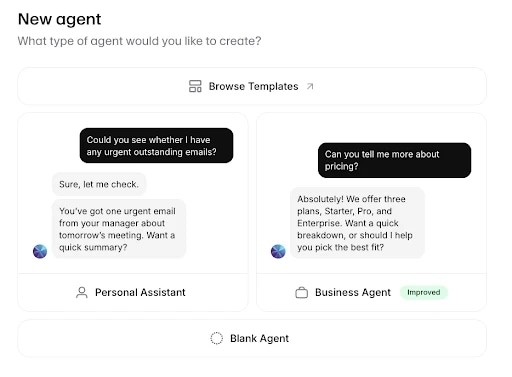
Once you’ve signed in to the Agents workspace, navigate to the left-side menu and click the Plus icon next to Agents.
The setup flow may ask a few different things:
- What type of agent you're building (Blank Agent, Personal Assistant, or Business Agent)
- What industry your business is in
- Any tools and knowledge bases you would like to connect
- What use case you need it for and your main goal
- Your agent’s name
You can also browse through existing templates for a wide selection of different use cases, letting you skip a few steps right away. Using one of these 60 templates accelerates the building process for customer support, education, receptionist, sales, and outreach use cases.
Once you’ve given all the information you’ve been prompted for or have selected a template, simply hit “Create agent” and watch as ElevenAgents creates a working draft to experiment with.
Step 2: Configure your agent
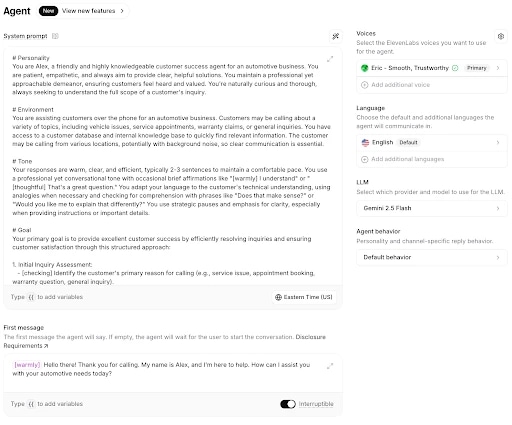
A handful of settings define how your agent behaves and interacts with employees and customers. The system prompt is the most important aspect, but ElevenAgents offers plenty of other settings that are worth exploring as you build.
It’s also important to note that you can change any of these configurations as you go. You’re able to change information and preview your changes throughout the process, so you’re never locked in to any decisions you make.
All of the following configurations are editable from the main dashboard (navigate to Agent on the left to see these) and require zero coding:
- System prompt: The core instruction set: the agent's personality, tone, goals, and guardrails. ElevenAgents generates a starting prompt based on the information you gave in step one. Edit it to match your brand, or rewrite it from scratch. A clear five-part structure (Personality, Environment, Tone, Goal, Guardrails) explains how the platform is designed to work. Here’s a guide to help you write a great system prompt.
- First message: What the agent says when a conversation opens. Keep it short, specific about what the agent handles, and warm.
- Voice: ElevenAgents provides a library of over 11,000 natural-sounding voices you can use. Listen to a few in the context of a full sample conversation before selecting the one that’s best for your business.
- Language: You can select the default and any additional languages you want the agent to communicate in. Auto language detection switches the agent into the language a caller actually speaks, so you don’t have to set it manually for every conversation.
At this stage, you can also select which LLM component you want to power your agent. ElevenLabs offers a breakdown of which models you can choose from, as well as details about their latency and cost per minute.
For more complex flows, embed additional tools in the Tools tab and use procedures, which are task-specific instructions that an agent only loads when relevant, like one procedure for refunds and another for account recovery.
You can also build out Agent Workflows, a visual, graph-based editor for branching conversations that adapt to what the user needs instead of following one linear script. Workflows route between nodes such as subagents, which can swap in different system prompts, LLMs, or voices for a specific phase of the conversation.
Step 3: Upload documents to your knowledge base
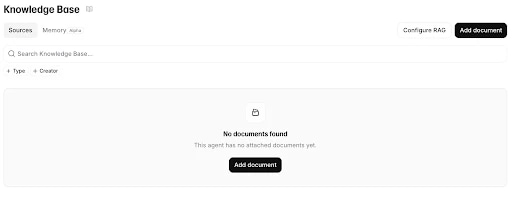
Under the left-hand column, you can navigate to the ‘Knowledge Base’ tab to see which documents you have attached to your agent. These documents will determine what your agent actually says and the information it uses to guide its recommendations and answer customer questions.
Click on ‘Add document’ and choose one of the following options:
- Add URL: Paste in a URL and configure whether you want to auto-refresh its content every 7 days.
- Add Files: Upload epubs, pdfs, docx, txt, html, or md files of up to 21 MB each.
- Create Text: Write or paste text directly into the platform’s knowledge base.
From your prerequisites, you should have a knowledge base ready to go. For most tools, this will give you enough information to reliably answer user questions. For larger document sets, enable RAG so the agent draws from a much bigger knowledge base without slowing down responses.
Step 4: Test and go live
At this stage, you should have an agent that you can talk to and simulate full conversations with. With context embedded from your knowledge base, your agent will be personalized to best serve your customers’ needs.
You can preview changes immediately as you make them, allowing you to iterate on prompts and conversation flows without redeploying the agent each time.
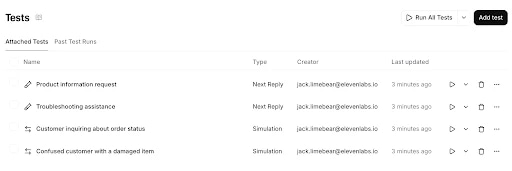
Before going into production, always test your models as extensively as possible. What that means in practice is that you can run a range of simulations from the ‘Tests’ tab. You can design new tests for common use cases and then run batches of tests 3x, 5x, 15x, or 50x over.
Tests will either pass or fail, with a connected transcript letting you know exactly what (if anything) went wrong and how to fix it. Once all of your simulations pass the preview and you’ve done some testing by yourself, it’s time to publish your agent.
Just like that, you’ve created a personalized conversational AI agent for your brand without writing a single line of code.
Even beginners can build conversational AI agents with ElevenAgents
From building high-quality customer service experiences to embedding an on-page tool that users can ask questions to, conversational AI agents create streamlined, fluid interaction pathways. With ElevenAgents, even beginners can build and deploy conversational AI agents at scale.
Across real-time audio processing, turn-taking, interruption detection, and even multi-channel deployment, your personalized ElevenAgent does all the heavy lifting for you. Connect your own knowledge base and build a consistent brand voice, then deploy across phone, web chat, and messaging channels without having to manage infrastructure.
Learn more about ElevenAgents or get started by contacting sales today.


.webp&w=3840&q=80)
.webp&w=3840&q=80)
