Payouts

Earn rewards by sharing your voice in the Voice Library.
Payouts

Overview

The Payouts system allows you to earn rewards for sharing voices in the Voice library. ElevenLabs uses Stripe Connect to process reward payouts.

Account setup

To set up your Payouts account:

  • Click on your profile icon in the top right corner and select “Payouts”.
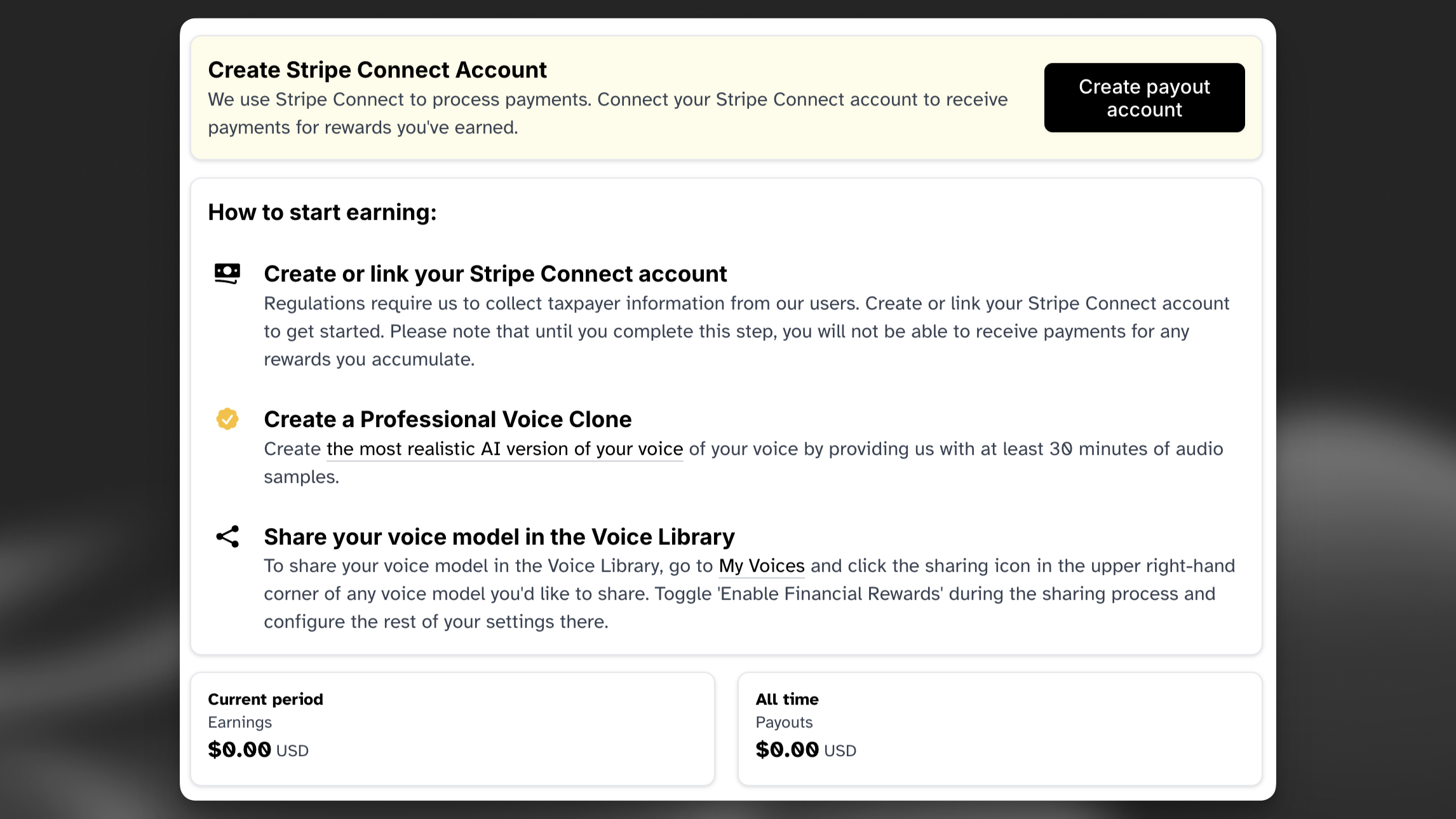
Payouts overview

  • Follow the prompts from Stripe Connect to complete the account setup.

Tracking usage and earnings

  • You can track the usage of your voices by going to “My Voices”, clicking “View” to open the detailed view for your voice, then clicking the sharing icon at the bottom. Once you have the Sharing Options open, click “View Metrics”.
  • The rewards you earn are based on the options you selected when sharing your voice in the Voice Library.
  • You can also see your all-time earnings and past payouts by going back to your Payouts page.

Reader app rewards

  • If your voice is marked as Studio Quality and you have activated the “Available in ElevenReader” toggle, your voice will made be available in the ElevenReader app. Rewards for ElevenReader are reported separately – to view your Reader App rewards, check the “ElevenReader” box on your “View Metrics” screen.

Things to know

  • Rewards accumulate frequently throughout the day, but payouts typically happen once a week as long as you have an active paid subscription and your accrued payouts exceed the minimum threshold. In most cases this is $10, but some countries may have a higher threshold.

  • You can see your past payouts by going to your Payouts page in the sidebar.

Supported countries

  • Currently, Stripe Connect is not supported in all countries. We are constantly working to expand our reach for Payouts and plan to add availability in more countries when possible.
  • Argentina
  • Australia
  • Austria
  • Belgium
  • Bulgaria
  • Canada
  • Chile
  • Colombia
  • Croatia
  • Cyprus
  • Czech Republic
  • Denmark
  • Estonia
  • Finland
  • France
  • Germany
  • Greece
  • Hong Kong SAR
  • China
  • Hungary
  • Iceland
  • India
  • Indonesia
  • Ireland
  • Israel
  • Italy
  • Japan
  • Latvia
  • Liechtenstein
  • Lithuania
  • Luxembourg
  • Malaysia
  • Malta
  • Mexico
  • Monaco
  • Netherlands
  • New Zealand
  • Nigeria
  • Norway
  • Peru
  • Philippines
  • Poland
  • Portugal
  • Qatar
  • Romania
  • Saudi Arabia
  • Singapore
  • Slovakia
  • Slovenia
  • South Africa
  • South Korea
  • Spain
  • Sweden
  • Switzerland
  • Thailand
  • Taiwan
  • Turkey
  • United Arab Emirates
  • United Kingdom
  • United States
  • Uruguay
  • Vietnam

FAQ

Why do I have to complete this form?

ElevenLabs is required by U.S. tax law to collect W-8/W-9 certification from anyone who receives payments from us. If you’re a U.S. tax resident, you’re required to submit W-9 certification. If you’re not a U.S. tax resident, you’re required to submit W-8 certification.

W-8/W-9 certification helps determine whether a reduced rate of tax withholding under a tax treaty applies to your payments.

How do I complete the form?

The form is processed via Stripe, which walks you through the steps. We also have a detailed guide available here.

Why are you withholding tax on payments to me?

By default, the U.S. requires a 30% withholding tax on certain types of payments to non-U.S. persons — including royalties. However, if your country has a tax treaty with the U.S., you may be eligible for a reduced withholding rate, which you can claim on the W-8 form. If you do not claim a treaty benefit, the 30% default rate applies.

We will withhold U.S. taxes on earnings from U.S. customer usage only (not your entire payout). Earnings from non-U.S. customer usage will not be included in withholdings.

Your payout dashboard will now include a column showing tax withheld for each past payout.

What will I receive from you?

Each year, we will issue a Form 1042-S showing the total amount we paid you and any U.S. tax we withheld. This form is sent by March 15 of the following calendar year and can be used when filing a U.S. tax return, if needed.

I already pay taxes in my own country why should I also pay U.S. tax?

Because the income you’re earning is U.S.-sourced (we are a U.S.-based company), we’re required to apply U.S. tax rules. You may still be able to claim a credit or deduction in your own country for the tax paid to the U.S., depending on your local laws.

Can I skip the form if I don’t live in the U.S?

No — if you’re receiving payments from us and you’re not a U.S. tax resident, we are still required to collect this form to properly apply U.S. tax rules. If we don’t receive a completed W-8, we may not be able to pay you or may have to apply maximum withholding (30%).

How do I know if my country has a tax treaty with the U.S.?

Stripe may also help you identify treaty eligibility as you complete the form, but you are responsible for verifying that you meet the conditions via the IRS website or a tax professional. 

What happens if I don’t complete the form?

If you don’t submit a completed W-8 form, we may be required to withhold the full 30% of your earnings from US customer usage until the form is received.

Voice Actor Payouts let you earn cash rewards when paid users generate audio with your Professional Voice Clone shared in the Voice Library. Earnings are calculated based on usage by paid users and exclude use by free users. Your default rate is determined by your selected notice period, and payouts are processed automatically through Stripe.

  • To get started, create a Professional Voice Clone of your voice. This feature is available on the Creator plan and above. We recommend uploading around 2 hours of clear, high-quality recordings containing only your voice, with consistent tone and no background noise, music, or effects. For detailed guidance, see our Professional Voice Cloning guide.
  • After uploading your samples, you’ll complete a Voice Captcha verification by reading a short text prompt within a set timeframe. Once verified, your voice will be added to the training queue. The process typically takes a few hours but may take longer at peak times.
  • Once training is complete, you can share your voice in the Voice Library. After a brief review by our team, your voice will become visible to other users who can save and use it to generate audio.
  • You can choose how long your voice remains available after you decide to withdraw it by setting a notice period. This ranges from immediate removal up to a two-year period. This flexibility lets you balance earning potential with personal preference while giving other users clarity on when they’ll need to transition away from your voice.
  • You can enable live moderation for your voice to prevent it from being used in restricted or sensitive content categories.
  • Your default payout rate is determined by the notice period you select for your voice.
  • To receive payments, you’ll need to set up a Stripe Connect account and maintain an active paid subscription (Starter plan or above). Payouts are processed automatically every 6–8 days once your earnings exceed the minimum threshold. In most cases, the threshold is $10, though some countries may have higher limits due to local regulations or payment provider requirements.

For more information, refer to our Terms of Service and Voice Library Addendum.

There are a couple of possible reasons why Payouts are not enabled for your account.

You have not completed the process of setting up your Payout account

Payouts won’t be enabled for your account until you have completed the process of setting up your Payout account, including agreeing to the Terms.

To complete the process, please visit your Payouts page, and click Complete Account Setup, and follow the steps. 

If you still see Complete Account Setup after completing all the steps, please contact Support by emailing team@elevenlabs.io.

You have not completed your W-8/W-9 certification

ElevenLabs is required by U.S. tax law to collect W-8/W-9 certification from anyone who receives payments from us and is not a U.S. tax resident. For more information on this, please see our article What is W-8/W-9 certification?

Payouts will be disabled for any user who does not have a valid tax form. To resume Payouts, please visit your Payouts page and click Manage Account.

You will then see Missing W-8/W-9 certification. To complete your certification, click Update and answer the questions in the form.

We are constantly working to expand our reach for our Voice Actor Payouts. Currently, this is the list that Stripe supports. As they add more countries to their allowed counties available for payouts, so will we.

  • Argentina
  • Australia
  • Austria
  • Belgium
  • Bulgaria
  • Canada
  • Chile
  • Colombia
  • Croatia
  • Cyprus
  • Czech Republic
  • Denmark
  • Estonia
  • Finland
  • France
  • Germany
  • Greece
  • Hong Kong SAR China
  • Hungary
  • Iceland
  • India
  • Indonesia
  • Ireland
  • Israel
  • Italy
  • Japan
  • Latvia
  • Liechtenstein
  • Lithuania
  • Luxembourg
  • Malaysia
  • Malta
  • Mexico
  • Monaco
  • Netherlands
  • New Zealand
  • Nigeria
  • Norway
  • Peru
  • Philippines
  • Poland
  • Portugal
  • Qatar
  • Romania
  • Saudi Arabia
  • Singapore
  • Slovakia
  • Slovenia
  • South Africa
  • South Korea
  • Spain
  • Sweden
  • Switzerland
  • Thailand
  • Taiwan
  • Turkey
  • United Arab Emirates
  • United Kingdom
  • United States
  • Uruguay
  • Vietnam

The W-8/W-9 certification will be requested when your first payout is processed. At this point, you will be notified that you need to complete the certification before you can receive your payouts.

To do this, click My Account and select Payouts to go to your Payouts page. Then click Manage Account.

You will see a section for W-8/W-9 certification, which will be marked Incomplete. Click Update to open the form

Answer the questions on screen. The first question, “Are you considered a U.S. person for Federal Tax Purpose?”, will determine whether you complete Form W-9 or Form W-8.

Are you considered a U.S. person for Federal Tax Purpose?

If yes, you will be prompted to complete Form W-9:

1If you have not already done so, enter your SSN.
2Certify the statement is accurate by signing.
3

Click Submit.

4

Click Confirm after you have reviewed your details.

If no, you will be prompted to complete Form W-8:

1

If you are connecting a business account, it will ask you for your tax classification. Select the appropriate classification from the drop-down menu.

2

Enter your country of citizenship.

3

Enter your non-U.S. Permanent residence address.

4

Enter your mailing address if its different from your permanent residence address.

5

Enter your U.S. Taxpayer ID if you have one.

6

Enter your non-U.S. Taxpayer Identification number if you have one. This will be the Tax ID for your country of residence. 

1

Check the box if non-U.S. Taxpayer Identification number not legally required, for example, if your country does not issue Tax IDs.

7

Tax Treaty Claims - if you would like to claim reduced rate of withholding tax, complete this section. This will allow Eleven Labs to apply a lower rate or 0% rate (depending on your country of residence) on the payments it remits to you. 

1

Are you claiming a reduced rate of withholding under a tax treaty? 

1

Select Yes to claim treaty benefits or No if you do not want to claim reduced rate of withholding. 

1

Type of income: select Royalties - Copyrights.

2

Country of residence: select from the drop-down menu.

3

Select the tax treaty article listed in the drop-down menu.

2

Certify that you do not have a permanent establishment or fixed base in the U.S. (i.e. a tax presence).

3

Select the rate that appears in the drop-down menu - this is configured based on your country of tax residence and the tax treaty it has with the U.S.

4

Read through and agree to the certification by checking the box and typing your name in the signature field.

5

Click Submit to submit your form.

Payouts are issued from the country of your Stripe connected account. If your external bank account is in the same country and currency, the payout typically appears as a domestic transfer. If your bank is in a different country or you’re paid in a different currency (for example, via alternative currency payouts), it may appear as an international transfer.

To gauge what to expect, compare the connected account’s country and currency with your external bank account’s country and currency—when they match, expect domestic; when they don’t, expect international.

No results